> ## Documentation Index
> Fetch the complete documentation index at: https://patterns.heurilens.com/llms.txt
> Use this file to discover all available pages before exploring further.
# Consistency
> A measurable UX pattern where users lose confidence and efficiency because interface rules change across pages, states, or components.
## Consistency as a UX failure pattern
A **Consistency Breakdown** occurs when the same elements, actions, or meanings
behave or appear differently across the product.
Users rely on **learned rules**.\
When those rules change unexpectedly, users slow down, hesitate, or make mistakes.
Consistency is not visual sameness.\
It is **predictability of meaning and behavior**.
Consistency is measurable because broken expectations produce hesitation, errors, and backtracking — not complaints.
## What typically breaks consistency
Common causes include:
* buttons that look the same but act differently
* the same action labeled differently across pages
* inconsistent spacing, alignment, or grouping rules
* components that change style or behavior between states
* navigation patterns that shift across sections
* form fields that validate differently in similar contexts
 ## Observable user behavior signals
When consistency breaks, users often:
* pause before interacting with familiar elements
* re-check labels or hover for confirmation
* make incorrect selections
* backtrack to “verify” what they just learned
* lose speed in otherwise simple flows
> When users stop trusting patterns, every step becomes a decision.
## Product-level signals Heurilens looks for
Heurilens flags consistency issues when it detects:
* identical components with different visual treatments
* repeated actions placed in different locations
* inconsistent feedback patterns (success, error, loading)
* similar pages using different hierarchy rules
* mismatched interaction states (hover, focus, disabled)
## How Heurilens detects this pattern
Compares shared components across pages to detect visual or behavioral drift.
Checks whether the same action uses consistent wording and intent.
Evaluates hover, focus, loading, and error states for consistency.
Detects spacing, alignment, and grouping inconsistencies across sections.
## Real-world examples (what this looks like on websites)
Typical signals:
* “Get started” on one page, “Try free” on another, “Sign up” elsewhere
* primary CTA placement changes between pages
What users do:
* hesitate before clicking
* re-read button labels
* delay commitment
Typical signals:
* required fields differ without explanation
* validation appears sometimes inline, sometimes after submit
What users do:
* make repeat errors
* re-enter information
* abandon forms out of frustration
Typical signals:
* similar pages structured differently
* active states unclear or inconsistent
What users do:
* lose orientation
* rely on back button
* explore less deeply
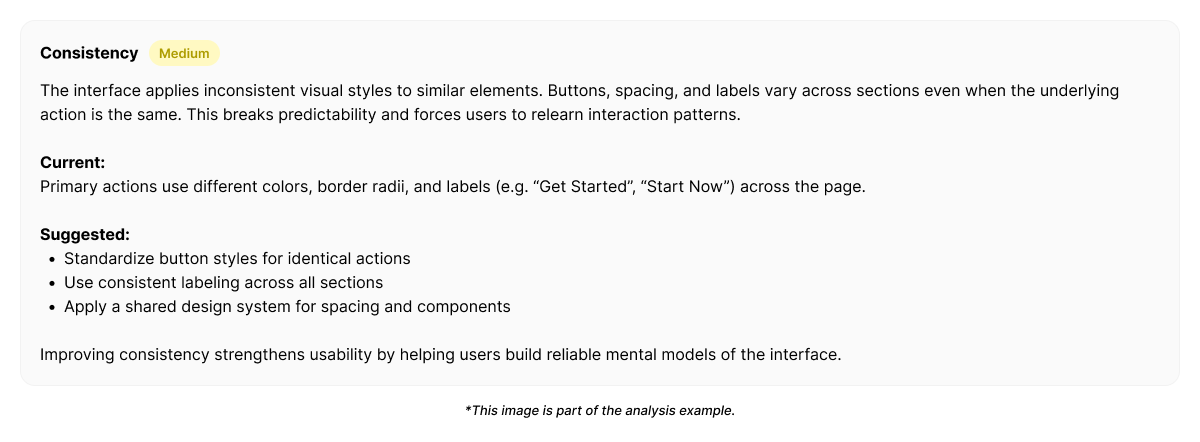
## Example output from Heurilens
Shared components and actions behave inconsistently across pages.
Users are required to re-learn interaction rules,
increasing hesitation and reducing flow efficiency.
## Example fix direction generated by Heurilens
Rather than enforcing sameness, Heurilens recommends **rule alignment**:
* define a single meaning per action (one label, one intent)
* standardize component behavior across states
* apply spacing and hierarchy rules consistently
* centralize feedback patterns (success, error, loading)
* treat navigation as a system, not page-by-page decisions
Consistency fixes reduce mental effort by preserving learned behavior — not by limiting design flexibility.
## Why this pattern matters
Consistency breakdowns rarely block users immediately.\
They erode **confidence and momentum**.
Over time, users:
* trust the product less
* move more cautiously
* convert less efficiently
This makes consistency issues subtle, cumulative, and expensive.
## Related patterns
Inconsistent hierarchy rules confuse attention priorities.
Re-learning rules increases mental effort.
Inconsistent text structure slows comprehension.
Forms amplify the cost of inconsistent rules.
Run an analysis and see where interface rules change unexpectedly.
## Observable user behavior signals
When consistency breaks, users often:
* pause before interacting with familiar elements
* re-check labels or hover for confirmation
* make incorrect selections
* backtrack to “verify” what they just learned
* lose speed in otherwise simple flows
> When users stop trusting patterns, every step becomes a decision.
## Product-level signals Heurilens looks for
Heurilens flags consistency issues when it detects:
* identical components with different visual treatments
* repeated actions placed in different locations
* inconsistent feedback patterns (success, error, loading)
* similar pages using different hierarchy rules
* mismatched interaction states (hover, focus, disabled)
## How Heurilens detects this pattern
Compares shared components across pages to detect visual or behavioral drift.
Checks whether the same action uses consistent wording and intent.
Evaluates hover, focus, loading, and error states for consistency.
Detects spacing, alignment, and grouping inconsistencies across sections.
## Real-world examples (what this looks like on websites)
Typical signals:
* “Get started” on one page, “Try free” on another, “Sign up” elsewhere
* primary CTA placement changes between pages
What users do:
* hesitate before clicking
* re-read button labels
* delay commitment
Typical signals:
* required fields differ without explanation
* validation appears sometimes inline, sometimes after submit
What users do:
* make repeat errors
* re-enter information
* abandon forms out of frustration
Typical signals:
* similar pages structured differently
* active states unclear or inconsistent
What users do:
* lose orientation
* rely on back button
* explore less deeply
## Example output from Heurilens
Shared components and actions behave inconsistently across pages.
Users are required to re-learn interaction rules,
increasing hesitation and reducing flow efficiency.
## Example fix direction generated by Heurilens
Rather than enforcing sameness, Heurilens recommends **rule alignment**:
* define a single meaning per action (one label, one intent)
* standardize component behavior across states
* apply spacing and hierarchy rules consistently
* centralize feedback patterns (success, error, loading)
* treat navigation as a system, not page-by-page decisions
Consistency fixes reduce mental effort by preserving learned behavior — not by limiting design flexibility.
## Why this pattern matters
Consistency breakdowns rarely block users immediately.\
They erode **confidence and momentum**.
Over time, users:
* trust the product less
* move more cautiously
* convert less efficiently
This makes consistency issues subtle, cumulative, and expensive.
## Related patterns
Inconsistent hierarchy rules confuse attention priorities.
Re-learning rules increases mental effort.
Inconsistent text structure slows comprehension.
Forms amplify the cost of inconsistent rules.
Run an analysis and see where interface rules change unexpectedly.