> ## Documentation Index
> Fetch the complete documentation index at: https://patterns.heurilens.com/llms.txt
> Use this file to discover all available pages before exploring further.
# Visual Hierarchy
> A measurable UX pattern where users struggle to identify priority, focus, and next actions due to competing visual signals.
## What is a Visual Hierarchy Failure?
A **Visual Hierarchy Failure** occurs when interface elements compete for attention
without a clear priority.
Users cannot easily determine:
* what matters most
* where to look first
* which action is primary
This is not an aesthetic issue.\
It is an **attention-order failure** that directly affects decision speed and confidence.
 ## Why visual hierarchy is measurable
When hierarchy fails, users leave consistent behavioral traces.
These traces appear before conversion, clicks, or form submissions.
Users shift focus between multiple elements without committing to one.
Users interact with visually prominent but non-primary elements.
The main CTA is seen late or after unnecessary exploration.
## User behavior signals
A Visual Hierarchy Failure is associated with:
* repeated scanning patterns
* hesitation before interaction
* misaligned clicks
* delayed task initiation
These behaviors indicate **confusion about priority**, not lack of interest.
## Product-level signals
At the interface level, this pattern often appears alongside:
* multiple elements with equal visual weight
* headings that do not dominate supporting content
* CTAs lacking contrast or separation
* inconsistent spacing and grouping
* color and size used without priority logic
## How Heurilens detects this pattern
Heurilens evaluates size, weight, color contrast, and positioning
to determine which elements visually dominate the viewport.
The system checks whether hierarchy signals remain consistent
across sections and states.
Primary actions are assessed for visual separation and clarity
relative to secondary actions.
When multiple elements compete for dominance, the pattern is flagged.
## Example output from Heurilens
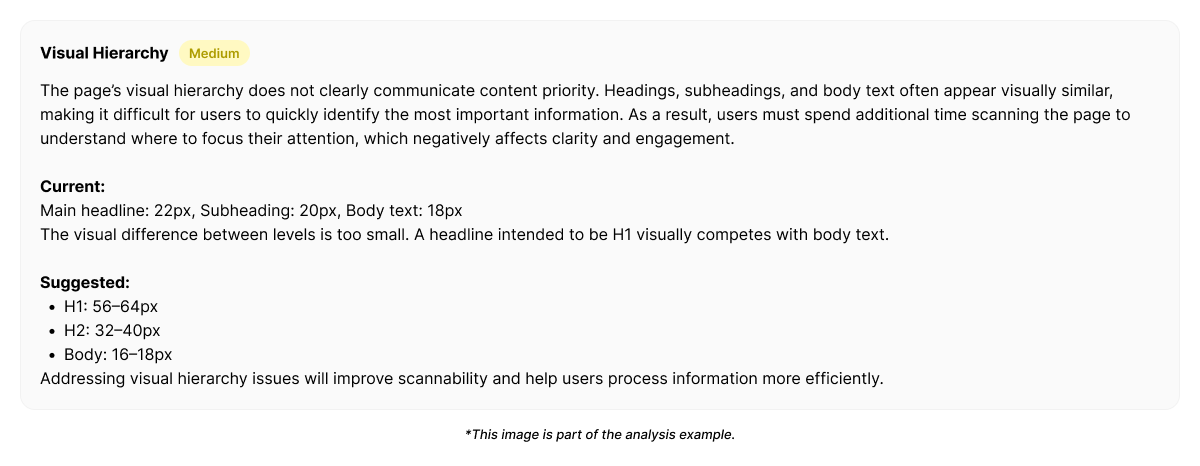
Multiple elements compete for attention within the initial viewport.
The primary action does not visually dominate supporting content,
causing attention to fragment and delaying the first meaningful interaction.
## Example fix generated by Heurilens
```css theme={null}
/* Establish clear visual priority */
.hero h1 {
font-size: 3rem;
font-weight: 700;
}
.hero .primary-cta {
margin-top: 24px;
}
.secondary-actions {
opacity: 0.6;
}
```
Code snippets represent **example outputs** generated in Heurilens reports. They illustrate how detected hierarchy signals can be resolved.
## Why this pattern matters
Visual hierarchy failures rarely block users outright.
Instead, they slow decisions, reduce confidence, and lower conversion efficiency.
Users eventually act — but later, less decisively, or incorrectly.
This makes hierarchy issues subtle but high-impact.
## Patterns commonly associated with this breakdown
When users fail to understand value and next steps immediately.
When too much information competes for attention at once.
When primary and secondary actions are visually indistinguishable.
When hierarchy rules change across sections or pages.
Visual hierarchy is not subjective design taste. It is reflected in where users look, hesitate, and act. Heurilens measures these signals to turn attention problems into structured, actionable insights.
Run an analysis and see how hierarchy failures appear across real interfaces.
## Why visual hierarchy is measurable
When hierarchy fails, users leave consistent behavioral traces.
These traces appear before conversion, clicks, or form submissions.
Users shift focus between multiple elements without committing to one.
Users interact with visually prominent but non-primary elements.
The main CTA is seen late or after unnecessary exploration.
## User behavior signals
A Visual Hierarchy Failure is associated with:
* repeated scanning patterns
* hesitation before interaction
* misaligned clicks
* delayed task initiation
These behaviors indicate **confusion about priority**, not lack of interest.
## Product-level signals
At the interface level, this pattern often appears alongside:
* multiple elements with equal visual weight
* headings that do not dominate supporting content
* CTAs lacking contrast or separation
* inconsistent spacing and grouping
* color and size used without priority logic
## How Heurilens detects this pattern
Heurilens evaluates size, weight, color contrast, and positioning
to determine which elements visually dominate the viewport.
The system checks whether hierarchy signals remain consistent
across sections and states.
Primary actions are assessed for visual separation and clarity
relative to secondary actions.
When multiple elements compete for dominance, the pattern is flagged.
## Example output from Heurilens
Multiple elements compete for attention within the initial viewport.
The primary action does not visually dominate supporting content,
causing attention to fragment and delaying the first meaningful interaction.
## Example fix generated by Heurilens
```css theme={null}
/* Establish clear visual priority */
.hero h1 {
font-size: 3rem;
font-weight: 700;
}
.hero .primary-cta {
margin-top: 24px;
}
.secondary-actions {
opacity: 0.6;
}
```
Code snippets represent **example outputs** generated in Heurilens reports. They illustrate how detected hierarchy signals can be resolved.
## Why this pattern matters
Visual hierarchy failures rarely block users outright.
Instead, they slow decisions, reduce confidence, and lower conversion efficiency.
Users eventually act — but later, less decisively, or incorrectly.
This makes hierarchy issues subtle but high-impact.
## Patterns commonly associated with this breakdown
When users fail to understand value and next steps immediately.
When too much information competes for attention at once.
When primary and secondary actions are visually indistinguishable.
When hierarchy rules change across sections or pages.
Visual hierarchy is not subjective design taste. It is reflected in where users look, hesitate, and act. Heurilens measures these signals to turn attention problems into structured, actionable insights.
Run an analysis and see how hierarchy failures appear across real interfaces.