> ## Documentation Index
> Fetch the complete documentation index at: https://patterns.heurilens.com/llms.txt
> Use this file to discover all available pages before exploring further.
# Accessibility
> A measurable UX pattern where accessibility gaps create exclusion, hesitation, and silent drop-offs across different user abilities and contexts.
## Accessibility is not compliance — it is usability under constraint
Accessibility is often treated as a checklist.
In reality, it is about **how the product behaves when conditions are not ideal**.
Accessibility issues surface when:
* vision is limited
* motor control is imprecise
* attention is reduced
* context is noisy or distracting
* technology behaves unexpectedly
These conditions do not affect a minority.
They affect **everyone**, eventually.
## When accessibility fails, users do not complain
Accessibility breakdowns rarely generate feedback.
Instead, users:
* fail silently
* hesitate longer than expected
* abandon without retry
* rely on workarounds
* avoid entire flows
These behaviors indicate **exclusion by friction**, not lack of intent.
## Observable behavior linked to accessibility issues
Accessibility-related friction often appears as:
* repeated focus without action
* navigation that stops unexpectedly
* form completion failures without errors
* unusually high drop-offs on simple tasks
* reduced completion rates across devices
These are usability failures under constraint.
 ## Accessibility signals Heurilens observes
The table below shows how accessibility issues translate
into measurable UX signals:
| Accessibility gap | User behavior signal | UX impact |
| ----------------------- | ---------------------------- | --------------------- |
| Low contrast text | Slow reading, zooming, exits | Reduced comprehension |
| Missing focus states | Keyboard users stall | Navigation failure |
| Unclear error messaging | Repeated form retries | Confidence loss |
| Small touch targets | Mis-taps, abandonment | Task failure |
| Non-semantic structure | Screen reader confusion | Flow breakdown |
Accessibility issues are not isolated problems.
They compound friction across the experience.
## High-risk accessibility moments
Accessibility matters most at moments where users are already under load:
1. **Forms and inputs**
* errors must be clear
* recovery must be possible
2. **Navigation**
* focus order must match intent
* location must be perceivable
3. **Critical decisions**
* information must be comparable
* actions must be distinguishable
4. **Mobile interaction**
* precision should not be required
* interruptions should be tolerated
Failures here disproportionately affect outcomes.
## How Heurilens evaluates accessibility
Heurilens evaluates interfaces as if users
have limited vision, motor control, or attention.
The system checks whether key actions
remain usable under imperfect conditions.
Heurilens analyzes whether accessibility gaps
cause unexpected flow interruptions.
Detected gaps are validated against
real user behavior patterns and drop-offs.
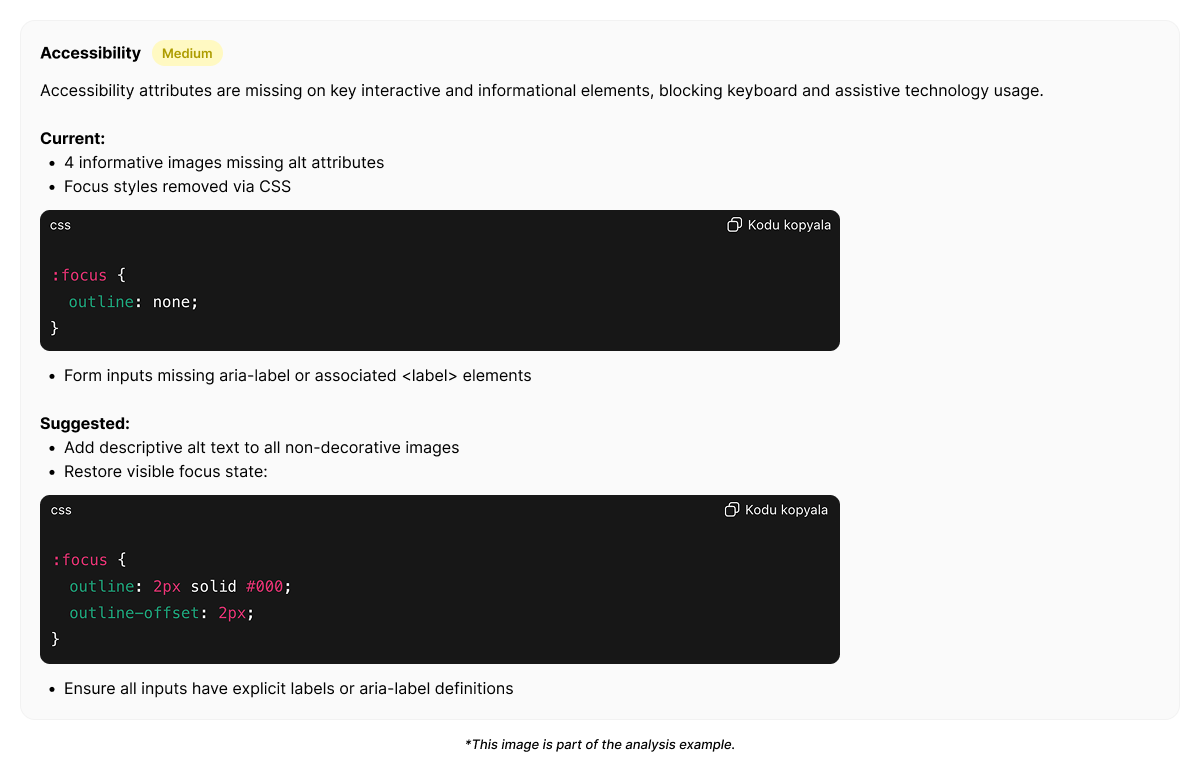
## Example output from Heurilens
Users fail to complete tasks without explicit errors.
Accessibility gaps increase hesitation and abandonment,
especially for keyboard and mobile users.
## Accessibility and UX are inseparable
Accessibility problems are often mislabeled as:
* low engagement
* weak conversion
* unclear UX
* poor onboarding
In reality, they are **barriers that prevent users from participating at all**.
Good accessibility does not add friction.
It removes invisible blockers.
## Related patterns
Mobile constraints amplify accessibility issues.
Accessibility gaps break conversion.
Feedback clarity supports accessibility.
Poor accessibility increases mental effort.
Run an analysis and identify where accessibility limits real user progress.
## Accessibility signals Heurilens observes
The table below shows how accessibility issues translate
into measurable UX signals:
| Accessibility gap | User behavior signal | UX impact |
| ----------------------- | ---------------------------- | --------------------- |
| Low contrast text | Slow reading, zooming, exits | Reduced comprehension |
| Missing focus states | Keyboard users stall | Navigation failure |
| Unclear error messaging | Repeated form retries | Confidence loss |
| Small touch targets | Mis-taps, abandonment | Task failure |
| Non-semantic structure | Screen reader confusion | Flow breakdown |
Accessibility issues are not isolated problems.
They compound friction across the experience.
## High-risk accessibility moments
Accessibility matters most at moments where users are already under load:
1. **Forms and inputs**
* errors must be clear
* recovery must be possible
2. **Navigation**
* focus order must match intent
* location must be perceivable
3. **Critical decisions**
* information must be comparable
* actions must be distinguishable
4. **Mobile interaction**
* precision should not be required
* interruptions should be tolerated
Failures here disproportionately affect outcomes.
## How Heurilens evaluates accessibility
Heurilens evaluates interfaces as if users
have limited vision, motor control, or attention.
The system checks whether key actions
remain usable under imperfect conditions.
Heurilens analyzes whether accessibility gaps
cause unexpected flow interruptions.
Detected gaps are validated against
real user behavior patterns and drop-offs.
## Example output from Heurilens
Users fail to complete tasks without explicit errors.
Accessibility gaps increase hesitation and abandonment,
especially for keyboard and mobile users.
## Accessibility and UX are inseparable
Accessibility problems are often mislabeled as:
* low engagement
* weak conversion
* unclear UX
* poor onboarding
In reality, they are **barriers that prevent users from participating at all**.
Good accessibility does not add friction.
It removes invisible blockers.
## Related patterns
Mobile constraints amplify accessibility issues.
Accessibility gaps break conversion.
Feedback clarity supports accessibility.
Poor accessibility increases mental effort.
Run an analysis and identify where accessibility limits real user progress.