> ## Documentation Index
> Fetch the complete documentation index at: https://patterns.heurilens.com/llms.txt
> Use this file to discover all available pages before exploring further.
# UX Writing
> A measurable UX pattern where unclear, generic, or mistimed copy causes hesitation, errors, and drop-offs at decision moments.
## UX writing as a UX signal
UX writing is not about tone alone.\
It is about **decision clarity**.
When copy works, users move forward without thinking.\
When it fails, users pause, reread, or abandon — even if the UI looks correct.
This makes UX writing **measurable through behavior**, not opinion.
## What breaks when UX writing fails
UX writing failures usually appear as:
* vague or generic labels
* instructions that arrive too late
* actions that sound similar but do different things
* system messages that explain *what happened* but not *what to do next*
* reassurance copy missing at high-risk moments
Users don’t say “this copy is bad.”\
They hesitate, make errors, or stop.
## Observable user behavior
You’ll often see:
* repeated hovering over buttons
* form errors caused by misunderstood fields
* users reading the same sentence twice
* delayed clicks on primary actions
* increased abandonment after error messages
> When users reread, copy has already failed.
 ## Where UX writing matters most
Typical issues:
* buttons labeled “Continue” without context
* multiple CTAs using similar language
* action labels that describe *navigation* instead of *outcome*
User behavior:
* hesitation before clicking
* wrong action selection
* backtracking
Typical issues:
* unclear field labels
* helper text hidden or missing
* error messages that don’t explain resolution
User behavior:
* repeated validation errors
* form abandonment
* slower completion
Typical issues:
* success messages without next steps
* errors that explain the problem but not the fix
* loading states with no expectation setting
User behavior:
* uncertainty after actions
* repeated clicks
* support requests
## Product-level signals Heurilens looks for
Heurilens evaluates UX writing based on **intent clarity**, not style.
Key checks include:
* does the copy clearly describe the outcome of an action?
* is the user told *what will happen next*?
* does the copy reduce uncertainty at risky moments?
* are similar actions labeled consistently?
* does feedback guide the user forward?
## How Heurilens detects UX writing issues
Locates moments where users must commit, submit, confirm, or choose.
Compares labels and messages against the actual system outcome.
Matches unclear copy with pauses, errors, and repeated interactions.
## Example output from Heurilens
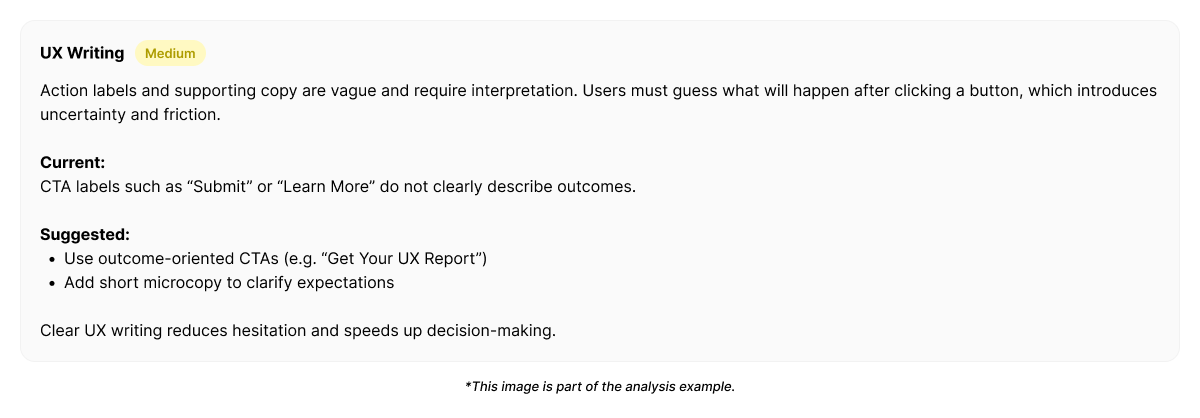
Action labels and helper text do not clearly communicate outcomes.
Users hesitate at decision points and trigger avoidable errors due to unclear or generic copy.
## Example improvement direction
Instead of “rewriting everything,” Heurilens suggests **clarity-first adjustments**:
* replace vague labels with outcome-oriented language
* move critical instructions *before* the action
* clarify consequences of irreversible actions
* align similar actions with consistent wording
* add reassurance copy at high-risk moments
Good UX writing reduces thinking — it does not add explanation.
## Why this pattern matters
UX writing failures rarely break flows completely.\
They **slow users down** and **increase friction silently**.
Users still complete tasks —\
just later, with more errors, or less confidence.
## Related patterns
Clear language reinforces credibility.
Copy quality directly affects form completion.
Unclear wording increases mental effort.
Inconsistent language breaks learned behavior.
Run an analysis and see where unclear copy slows users down.
## Where UX writing matters most
Typical issues:
* buttons labeled “Continue” without context
* multiple CTAs using similar language
* action labels that describe *navigation* instead of *outcome*
User behavior:
* hesitation before clicking
* wrong action selection
* backtracking
Typical issues:
* unclear field labels
* helper text hidden or missing
* error messages that don’t explain resolution
User behavior:
* repeated validation errors
* form abandonment
* slower completion
Typical issues:
* success messages without next steps
* errors that explain the problem but not the fix
* loading states with no expectation setting
User behavior:
* uncertainty after actions
* repeated clicks
* support requests
## Product-level signals Heurilens looks for
Heurilens evaluates UX writing based on **intent clarity**, not style.
Key checks include:
* does the copy clearly describe the outcome of an action?
* is the user told *what will happen next*?
* does the copy reduce uncertainty at risky moments?
* are similar actions labeled consistently?
* does feedback guide the user forward?
## How Heurilens detects UX writing issues
Locates moments where users must commit, submit, confirm, or choose.
Compares labels and messages against the actual system outcome.
Matches unclear copy with pauses, errors, and repeated interactions.
## Example output from Heurilens
Action labels and helper text do not clearly communicate outcomes.
Users hesitate at decision points and trigger avoidable errors due to unclear or generic copy.
## Example improvement direction
Instead of “rewriting everything,” Heurilens suggests **clarity-first adjustments**:
* replace vague labels with outcome-oriented language
* move critical instructions *before* the action
* clarify consequences of irreversible actions
* align similar actions with consistent wording
* add reassurance copy at high-risk moments
Good UX writing reduces thinking — it does not add explanation.
## Why this pattern matters
UX writing failures rarely break flows completely.\
They **slow users down** and **increase friction silently**.
Users still complete tasks —\
just later, with more errors, or less confidence.
## Related patterns
Clear language reinforces credibility.
Copy quality directly affects form completion.
Unclear wording increases mental effort.
Inconsistent language breaks learned behavior.
Run an analysis and see where unclear copy slows users down.